> ## Documentation Index
> Fetch the complete documentation index at: https://docs.weborion.io/llms.txt
> Use this file to discover all available pages before exploring further.
# GenAI Triage
> Assign severity levels to detected changes
GenAI Triage acts as a virtual SOC analyst, prioritising alerts based on severity level — high, medium or low-risk. Users can configure which severity levels they wish to receive alerts for, and configure GenAI Triage Preferences to finetune the model for particular types of changes.
GenAI Triage is an additional paid add-on. Please contact our Sales team ([sales@cloudsine.tech](mailto:sales@cloudsine.tech)) for more information. If you have GenAI Triage but do not see the **AI Triage** menu, reach out to [Customer Support](/defacement-monitor/getting-support/customer-support).
## Configuring GenAI Triage Rules for a webpage
Triage levels are set per domain from the **AI Triage** tab in the webpage configuration.
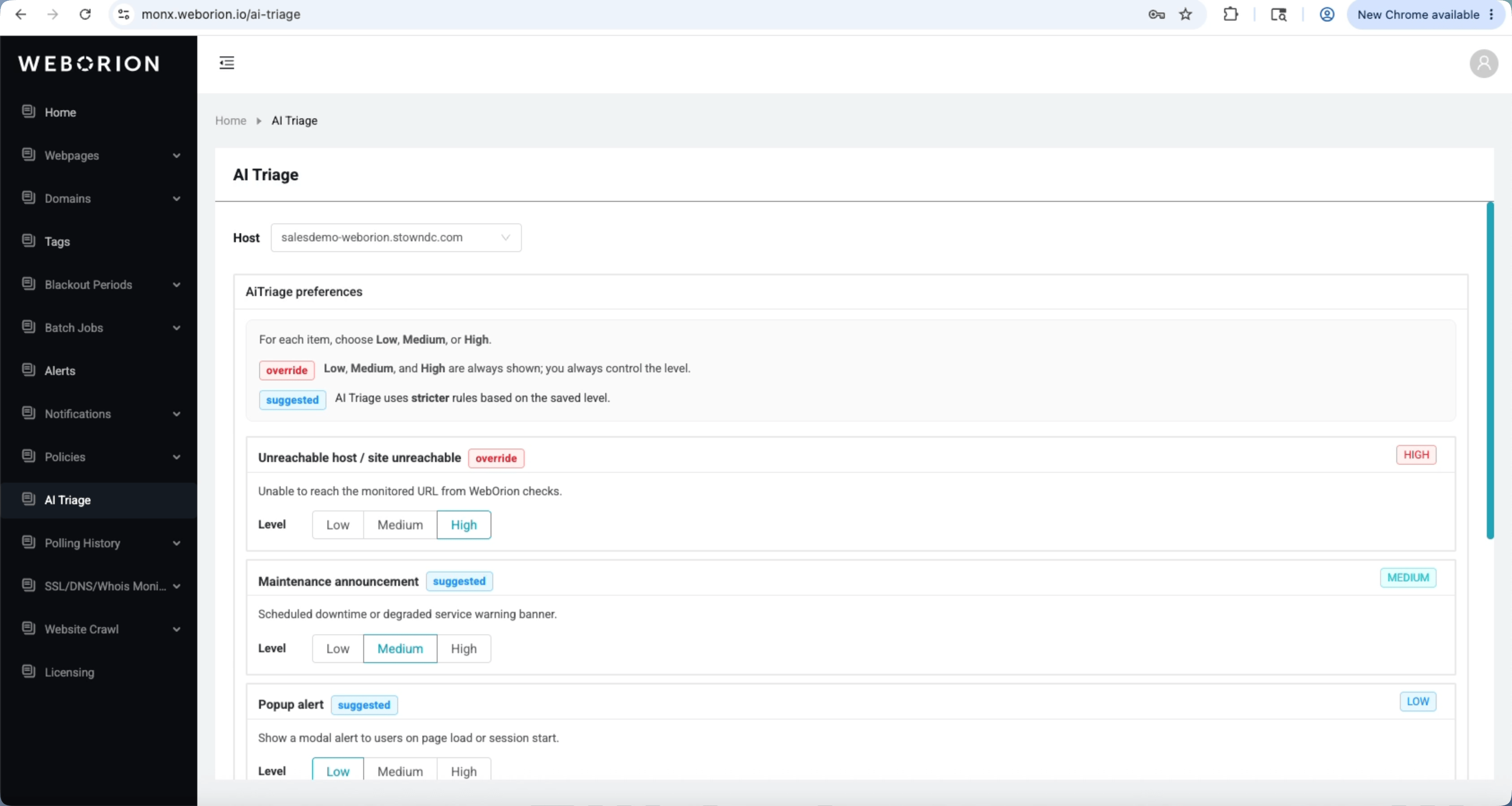 1. Go to **Webpage → View Webpages**
2. Click **⋮ → Configuration** on the relevant webpage
3. Select the **AiTriage Rules** tab
4. Under **AiTriage preferences**, choose a level, **Low**, **Medium**, or **High**, for common triage items
5. Click **Save**
The badge on the right of each item shows its current effective level (`LOW`, `MEDIUM`, or `HIGH`).
Alternatively, click AI Triage in the sidebar menu, choose your host URL and change the preferences.
### Override vs suggested items
Each triage item is either an **override** item or a **suggested** item, shown by a badge next to the item name. This determines how the level you choose is applied:
| Mode | Behaviour |
| ------------- | ------------------------------------------------------------------------------------------------------------------------ |
| **Override** | Low, Medium, and High are always shown, and the level you pick is applied exactly as set. |
| **Suggested** | AI Triage applies **stricter** rules based on the level you save, using your choice as a baseline it can tighten around. |
1. Go to **Webpage → View Webpages**
2. Click **⋮ → Configuration** on the relevant webpage
3. Select the **AiTriage Rules** tab
4. Under **AiTriage preferences**, choose a level, **Low**, **Medium**, or **High**, for common triage items
5. Click **Save**
The badge on the right of each item shows its current effective level (`LOW`, `MEDIUM`, or `HIGH`).
Alternatively, click AI Triage in the sidebar menu, choose your host URL and change the preferences.
### Override vs suggested items
Each triage item is either an **override** item or a **suggested** item, shown by a badge next to the item name. This determines how the level you choose is applied:
| Mode | Behaviour |
| ------------- | ------------------------------------------------------------------------------------------------------------------------ |
| **Override** | Low, Medium, and High are always shown, and the level you pick is applied exactly as set. |
| **Suggested** | AI Triage applies **stricter** rules based on the level you save, using your choice as a baseline it can tighten around. |